
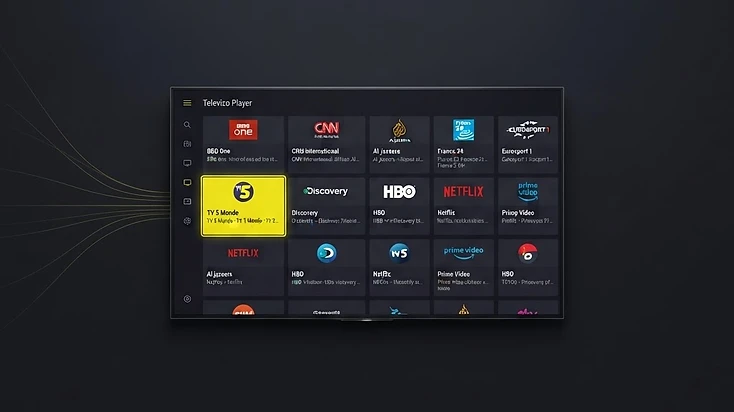
1. What Is an IPTV Player?
An IPTV player is an application that reads television or media data you already have access to and turns it into something you can watch. The data usually arrives as a playlist — a list of channel names and the addresses their streams live at — or as an account on a provider's server. The player parses that list, groups it, draws a channel guide, and opens a stream when you select one.
That definition sounds modest, and it is the point: the player is the layer between a raw list of addresses and a usable television interface. On its own a playlist is a wall of URLs. The player is what adds groups, search, favourites, logos, programme schedules and a playback screen with pause, track selection and channel switching.
- What a player does: loads your playlist or account, organizes channels into groups, remembers favourites, displays the guide if your source supplies one, decodes the stream and drives playback.
- What a player does not do: supply channels, host the video, guarantee picture quality, or decide what content your subscription contains.
- What you supply: compatible credentials from a service you are authorized to use. Installed with nothing added, a player shows an empty list — and that is normal.
This is also why two different players can show the same playlist and feel nothing alike. The channels, quality and guide come from the source; the grouping logic, layout, search behaviour and remote-control ergonomics come from the player. Judging a player by the content it displays is judging the wrong half of the system.
2. How Playlists Work
A playlist is the handover point. It contains the entries the player will present — for each one, at minimum a name and a stream address, and often extra tags describing the group it belongs to, a logo and an identifier used to match guide data. Two formats dominate, and they differ less in what they carry than in how the player gets hold of it.
M3U: one link, downloaded as a file
An M3U playlist is plain text. Each entry typically has a line beginning with #EXTINF carrying the channel name and any attributes your provider included — group-title for the group, tvg-id for the guide match, tvg-logo for the icon — followed by the URL of the stream itself. When you paste an M3U link into a player, the app downloads that file once and builds your list from everything inside it.
Because the whole catalog arrives in a single download, M3U is quick to set up and completely portable: one string moves your entire list to another device. The trade-off is that the file is a snapshot. Channels your provider adds, renames or removes do not appear until the player downloads the file again, and since a guide is not part of the playlist, an M3U almost always needs a separate guide URL before any schedule appears.
Xtream Codes: an account the player queries
An Xtream Codes login is not a file but a set of credentials: a server address, a username and a password. The player sends those three values to the provider's server, which answers with your account's categories and streams — typically keeping live channels, movies and series separate — and often with guide data in the same response. Nothing is frozen, because every refresh asks the server what exists right now.
The cost is precision. Three fields mean three chances for a typo, and a wrong character in the server address produces the same generic failure as an expired subscription. Some servers also limit how often a player may request the catalog, so repeated manual refreshes can be throttled. In exchange you get categories maintained server-side, content that stays current, a guide that usually arrives without extra configuration, and credentials that are harder to leak than a single shareable URL.
Whichever format your provider supplies, the playlist only controls how the list reaches the player. It does not change the streams themselves, so switching formats on the same account gives you the same channels in a different wrapper.
3. What Is EPG?
EPG stands for Electronic Program Guide: the on-screen schedule that tells you what is airing now, what started twenty minutes ago and what begins tonight. In data terms it is a feed — most often XMLTV — listing programmes with a channel identifier, a title, a start time, an end time and often a short description. The player reads that feed, matches each entry to the right channel in your playlist, and lays the result out as a timeline or as programme information attached to each channel.
The part that surprises people is that playback and the guide travel separately. A playlist says where a stream lives; a guide feed says what is playing on it. That is why an entirely healthy setup can show every channel perfectly and a blank guide at the same time — the streams are arriving, the schedule is not.
- The guide is only as good as the identifiers: an EPG entry matches a channel when the feed's channel ID matches the tvg-id in the playlist. A mismatch leaves that channel without a schedule while its neighbours look fine.
- An M3U link carries no schedule by itself, so a guide URL has to be attached in the player. Xtream accounts commonly return guide data alongside the login.
- A refresh fixes stale data, not missing data. If your provider publishes no EPG, no amount of reloading will produce one.
- Guide time can differ from your clock if the feed uses another timezone or daylight-saving rule — check the feed before assuming the player is wrong.
4. Player vs Service: The Distinction That Explains Everything
Most confusion about IPTV comes from collapsing two separate things into one. The player is software you install. The service is the account that supplies channels, streams and usually guide data. They are usually sold by different people, updated on different schedules, and they fail in different ways — which is exactly why the distinction is worth learning.
The player is responsible for…
- Reading and organizing your playlist or account
- Groups, search, favourites and channel ordering
- Displaying the guide your source provides
- Decoding and playing the stream
- The interface you navigate with a remote
The service is responsible for…
- Which channels and on-demand titles exist
- Stream resolution, bitrate and server capacity
- Whether guide data is published at all
- Credentials, account status and expiry
- Connection limits and device rules
That split gives you a diagnostic rule you can apply in seconds. If everything breaks at once — the app will not open, or no playlist of any kind will load — the player or device is the suspect. If channels load but one stream stutters, if the guide alone is empty, or if a message mentions your account, the source is the suspect. If every device in the house struggles at the same moment, look at the network.
The same rule applies to picture quality, which is a common source of misplaced blame. Resolution, bitrate, encoding and server load are set by the service; the player and your device only decode what arrives. Switching players rarely improves a weak stream, and upgrading a subscription never fixes a device that cannot decode the codec.
5. Where Televizo Fits
Televizo Player is the player layer of this system and nothing more: a free application for Android phones and tablets, Android TV, Google TV, Amazon Fire TV and Android-based Smart TVs. You install it, add an M3U playlist or Xtream Codes account you are authorized to use, and it presents that data as groups, favourites, a guide and a playback screen built to be driven by a remote as comfortably as by touch.
It handles multiple named playlists, so an M3U link and an Xtream account can sit side by side while you decide which to keep; channel and group blocking, so a large catalog can be trimmed to what you actually watch; sorting and search that stay usable at tens of thousands of entries; and an electronic program guide whenever your source supplies one. Televizo Premium is an optional upgrade for extra player features, and a TV service subscription, if you need one, is a separate optional purchase that no player can substitute for.
In the system diagram above, Televizo is the middle stage: it receives compatible data, organizes it, and hands a clean interface to your device. It is deliberately not the source of the streams, and it does not decide what your account contains.
Common questions
Televizo Editorial Team
Product Documentation & Support
The Televizo Editorial Team writes and maintains the official documentation for Televizo Player. We test every guide on real Android TV, Fire TV, Google TV and Smart TV hardware using both M3U and Xtream Codes playlists, and we update articles whenever the app or setup steps change.
Published 15 Sep 2026 · Last updated 31 Oct 2026 · Reviewed for accuracy 31 Oct 2026
Related Televizo Guides
Ready to get started?
Install Televizo, add your playlist, or get help from our support team.