
What to Look for in an IPTV Player for Android TV
Choosing an IPTV player for Android TV is different from choosing one for a phone. On a TV, you navigate with a remote, sit several feet from the screen, and need an interface that is readable, responsive and built for a 10-foot viewing experience. Not every player that works on a phone works well on a TV.
Before comparing specific apps, here are the criteria that matter most when choosing an IPTV player for Android TV in 2026.
Playlist Format Support
The player must support the playlist format your service provides. The two main formats are M3U (a single URL containing your channel list) and Xtream Codes (a server address, username and password). A player that supports both gives you flexibility if you change providers or run multiple playlists side by side.
EPG (Electronic Program Guide)
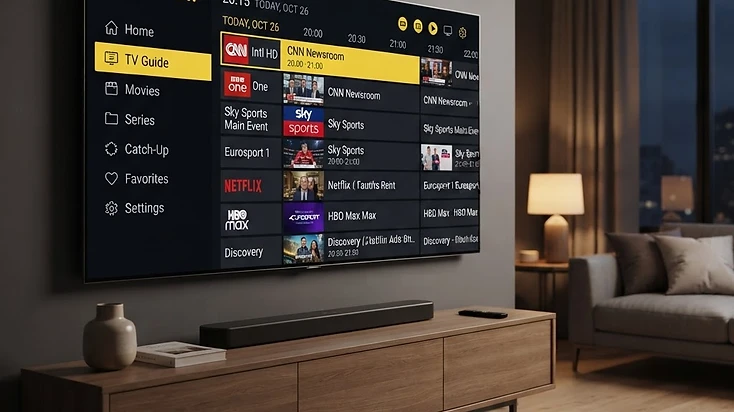
An EPG shows what is on now and what is coming next for each channel. It is essential for a TV viewing experience — without it, you are scrolling a flat list of channel names with no schedule context. The player should display EPG data when your provider supplies it and let you refresh the guide.
Performance and Lightweight Design
Android TV hardware ranges from high-end Nvidia Shield to budget sticks with limited RAM. A lightweight player that loads fast, scrolls smoothly and does not consume excessive memory is better than a feature-heavy app that stutters on modest hardware. Performance on a TV matters more than feature count.
Remote Control Navigation
On a TV, you navigate with a directional pad and select button — not a touchscreen. The interface needs large, focusable elements, clear highlighting of the selected item, and logical navigation between categories, channels and settings. A player designed for touchscreens first is frustrating on a TV.
Multiple Playlist Support
If you use more than one playlist — for example, separate sources for live TV and movies — the player should let you add and switch between multiple playlists without re-entering credentials each time.
Organization Features
Favorites, channel groups, and the ability to hide channels or groups you never watch keep a large channel list manageable. These player-level features work regardless of which playlist you use.
Price and Licensing
Some players are free, some require a one-time purchase, and some use a freemium model with a free tier and a paid upgrade. The price of the player is separate from any TV service subscription — you may pay for the player, the service, or both.
Top IPTV Players for Android TV in 2026
These are the most widely used IPTV players for Android TV in 2026. Each supports M3U and Xtream Codes playlists and is designed for TV navigation. They differ in price, feature depth, and the level of official support available.
For a detailed side-by-side feature comparison, see our dedicated comparison page.
Compare IPTV players feature by feature →1. Televizo Player
Televizo Player is a free, lightweight IPTV player for Android TV, Fire TV, Google TV and Android phones and tablets. It supports M3U and Xtream Codes playlists, multiple playlists, EPG, favorites, channel groups, channel blocking and catch-up. The interface is clean and built for remote navigation, with a grid or list channel view and a customizable guide.
Televizo is free to install from the Google Play Store, with an optional Premium upgrade for extra player features. It is the only player in this list with a dedicated official support website and setup guides for every major device — which makes it the easiest to recommend for users who want help getting started.
2. TiviMate
TiviMate is a popular paid IPTV player for Android TV with a polished, TV-first interface. It supports M3U and Xtream Codes, multiple playlists, EPG, favorites and a customizable layout. The free tier is limited — you can add one playlist and basic features — and the full version requires a paid license or subscription.
TiviMate is well-regarded for its interface design and reliability on Android TV, but the paid model means you need to budget for the license. It does not have an official support website comparable to Televizo's documentation hub.
3. XCIPTV
XCIPTV is a free, open-source IPTV player for Android TV. It supports M3U and Xtream Codes, EPG, and multiple playlists. The interface is functional and supports customization through different skins. Because it is open source, it is maintained by a community rather than a dedicated company.
XCIPTV is a solid free alternative, though the interface is less refined than Televizo or TiviMate, and support relies on community forums rather than official documentation.
4. IPTV Smarters
IPTV Smarters is a free IPTV player available on Android TV and other platforms. It supports M3U and Xtream Codes, EPG, and content categorization into Live, Movies and Series. The interface is designed for both touch and remote navigation, though it was originally built for mobile and adapted for TV.
IPTV Smarters is a good choice if your provider recommends it or if you want a player that also runs on non-Android devices. On Android TV specifically, the TV-optimized players above generally offer a smoother remote experience.
| Player | Price | M3U + Xtream | EPG | Multiple playlists | Official support site |
|---|---|---|---|---|---|
| Televizo | Free (Premium optional) | Yes | Yes | Yes | Yes |
| TiviMate | Paid (free tier limited) | Yes | Yes | Yes (paid) | No |
| XCIPTV | Free (open source) | Yes | Yes | Yes | Community only |
| IPTV Smarters | Free | Yes | Yes | Yes | Limited |
Why Televizo Stands Out for Android TV
Among the top IPTV players for Android TV, Televizo stands out for three reasons that matter to most users: it is free, it has an official support site, and it is lightweight enough to run well on any Android TV device.
Free to Install and Use
Televizo Player is free to install from the Google Play Store and free to use. The core features — multiple playlists, EPG, favorites, channel groups, channel blocking, grid and list layouts — are all available without paying. Televizo Premium is an optional one-time upgrade that adds extra player features; it is not required to use the app.
This matters because some players lock core features behind a paywall or limit you to a single playlist in the free tier. With Televizo, you get a fully functional player from the start.
Official Support Site and Setup Guides
Televizo is the only player in this list with a dedicated official support website — this one. The site includes setup guides for every major Android TV device, a troubleshooting hub, a blog with detailed articles, and a contact form for direct support. When something goes wrong, you have a documented, maintained resource rather than relying on community forums.
For most users, having official documentation is the difference between a five-minute fix and hours of searching forum threads. If you are new to IPTV players, this support infrastructure makes Televizo the easiest player to get started with.
Browse Android TV setup guides →Lightweight and Fast
Televizo is built to be lightweight. It loads quickly, scrolls smoothly, and does not consume excessive memory — which means it runs well on budget Android TV sticks as well as high-end boxes. On a TV, where you want to open the app and start watching without delay, performance is more important than a long feature list.
The interface is designed for remote navigation first, with large focusable elements, clear highlighting, and logical navigation between Live, Movies, Series and settings. This makes it comfortable to use from across the room with a standard TV remote.
How to Get Started with an IPTV Player on Android TV
Once you have chosen an IPTV player, getting started takes only a few minutes. The process is the same regardless of which player you choose — the difference is in how well the setup is documented.
- 1
Install the player
Download your chosen IPTV player from the Google Play Store on your Android TV device, or sideload the official APK if it is not in the store.
- 2
Get your playlist
Obtain a compatible M3U URL or Xtream Codes credentials from a service you are authorized to use. The player does not provide channels — you add your own playlist.
- 3
Add the playlist
Open the player, choose Add Playlist, select M3U or Xtream Codes, and enter your URL or server, username and password.
- 4
Let it load
Wait for the playlist to load. Large lists can take a few extra seconds. Your channels and groups appear once the data is fetched.
- 5
Organize and watch
Set up favorites, hide channels you do not watch, and start browsing Live, Movies or Series. Select anything to play.
For step-by-step installation instructions for Televizo on Android TV, follow the dedicated setup guide.
Install Televizo on Android TV — full guide →If you do not yet have a compatible TV service, you can explore subscription plans that work with Televizo Player and other compatible players.
View compatible TV service plans →To see how Televizo compares to other IPTV players feature by feature before you decide, use the comparison page.
Compare IPTV players →Best IPTV Player for Android TV — FAQ
These are the most common questions about choosing an IPTV player for Android TV, with direct answers.
Televizo Editorial Team
Product Documentation & Support
The Televizo Editorial Team writes and maintains the official documentation for Televizo Player. We test every guide on real Android TV, Fire TV, Google TV and Smart TV hardware using both M3U and Xtream Codes playlists, and we update articles whenever the app or setup steps change.
Published 26 Sep 2026 · Last updated 26 Sep 2026 · Reviewed for accuracy 26 Sep 2026
Related Televizo Guides
Ready to get started?
Install Televizo, add your playlist, or get help from our support team.